Multi-Shot Molding Process Setup Options
The Multi-Shot Molding process provides the following setup options:
Number of Cavities
Note: This setup option specifies the number of top-level assemblies that are handled by each core tool or cavity tool. It does not specify the number of cavity tools.
This setup option provides the following choices for the number of top-level mold cavities per stage:
-
-
Based on annual volume (single mold): aPriori calculates the minimum number of cavities that Meets the Production Requirements of the current scenario.
-
Optimize for minimum cost: aPriori calculates the number of cavities in the Most Cost-efficient Cavity Layout.
-
User defined value: aPriori uses the user-specified cavity count (powers of 2 between 1 and 128 inclusive).
In all cases, aPriori selects a cavity layout (a rectangular array of cavities) from the lookup table tblLayoutNumCav.
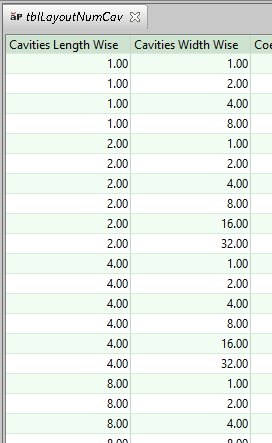
It selects a layout that is as close as square as possible, using the given number of cavities; that is, it finds a row that satisfies the following (“PFR” stands for “plastic forming region”):
-
The product of the values in the columns Cavities Lengthwise and Cavities Widthwise is the given number of cavities.
-
The values of Cavities Lengthwise and Cavities Widthwise minimize the difference between the mold base length and width; that is, minimize the difference between, roughly, the following quantities:
-
Cavities Lengthwise * PFR Length + Runner Region Allowance
-
Cavities Widthwise * PFR Width + Runner Region Allowance
-
(The mold base dimensions are also augmented by some additional allowances related to temperature control.)
See also Runner Volume and Runner Area for Multi-Shot Molding.
Most Cost-efficient Cavity Layout
aPriori chooses the most cost-efficient number of cavities as follows:
-
For each candidate cavity count (powers of 2 between 1 and 128 inclusive):
-
Select the layout that is closest to square, given the Dimensions of the Plastic Forming Region in the Plastic Molding chapter.
-
Determine the fully burdened part cost using the selected layout.
-
-
Choose the number of cavities in the layout that results in the lowest cost.
Meets the Production Requirements
Calculation of the number of cavities that can accommodate production requirements depends on the following:
-
Required annual volume
-
Values of the following Digital Factory variables (starting point values shown in parentheses)
-
Production Days Per Year (253)
-
Shifts Per Day (2)
-
Hours Per Shift (8)
-
Plant Efficiency (0.95)
-
-
Inject/cool/eject time. This value is estimated in starting point Digital Factories as 1.2 times the Cool Time for the stage with the longest cool time. Administrators can customize the fraction of inject/cool/eject time represented by cool time by using the cost model variable coolTimeRatioFactor (0.8 in starting point Digital Factories).
In the lookup table layoutNumCav aPriori selects the first row whose value for Number of Cavities is greater than or equal to the required number of cavities. In starting point Digital Factories, this is the smallest power of 2 (up to 128) that can meet the production requirements. (The maximum number of cavities is 128; if the required number of cavities is greater, the number of cavities is set to 128.)
Number of Hot Drops
The number of hot drops drives hard tooling costs.
By default in starting point Digital Factories, aPriori assumes that only a cold runner system is used. With the following cost model variables, administrators can customize the default and specify a default hot drop type and a default number of hot drops:
-
defaultHotDropType: Standard or SVG (Standard in starting point Digital Factories)
-
defaultNumHotDrops (0 instarting point Digital Factories)
With this setup option, users can override the default on a per-part basis and specify either a number of standard hot drops or a number of Sequential Valve Gates (SVG) hot drops.
Gating Type for Cold Runner System
Changing between edge and center gating can decrease or increase the runner length, which affects runner volume, and runner area (see Runner System Model in the Plastic Molding chapter). These values drive tooling cost (see Tooling for Multi-Shot Molding), machine selection (see Machine Selection for Multi-Shot Molding ), and material utilization (see Material Cost and Utilization for Multi-Shot Molding).
By default, the gating type is specified by the cost model variable defaultGatingType (Edge in starting point Digital Factories).
With this setup option, users can override the default.
Number of Plates in Mold
The number of mold plates drives tooling cost.
By default, molds are assumed to have two or three plates, as specified by the cost model variable defaultNumberOfPlates (2 in starting point Digital Factories). If defaultNumberOfPlates has a value other than 2 or 3, molds are assumed to have two plates, by default.
With this setup option, users can override the default number of mold plates on a per-part basis.
Cavity Machined from Insert
This specifies whether the cavity and water line channels are drilled directly into the solid mold base, or into smaller inserts which then are placed into the solid mold base. This choice affects spacing allowances, which drive mold base size, tooling cost (see Tooling for Multi-Shot Molding), machine selection (see Machine Selection for Multi-Shot Molding ), and material utilization (see Material Cost and Utilization for Multi-Shot Molding).
By default, whether inserts are assumed is governed by one of the following:
-
Cost model variable defaultEnablePlasticFormingRegionInserts (if the cost model variable defaultInsertMethod is SPECIFY)
-
Lookup by number of mold cycles (annual production volume divided by number of cavities) in the lookup table tblSpiType (otherwise).
With this setup option, users can override the default on a per-part bases. Select true or false.
Lower Recommended Shot Size Percentage Limit
This value affects machine selection. It places a lower limit on the fraction of a machine’s barrel capacity that is used for a shot. A machine is not considered feasible if the part’s required shot size (see Required Shot Size) is less than this fraction of the machine’s Max Shot Size (see Machine Selection for Multi-Shot Molding ).
By default, the lower recommended shot size percentage is specified by the cost model variable recommendedShotSizeLimitLower (0.1 in starting point Digital Factories).
With this setup option, users can override the default on a per-part basis.
Upper Recommended Shot Size Percentage Limit
This value affects machine selection. It places an upper limit on the fraction of a machine’s barrel capacity that is used for a shot. A machine is not considered feasible if the part’s required shot size (see Required Shot Size) is greater than this fraction of the machine’s Max Shot Size (see Machine Selection for Multi-Shot Molding ).
By default, the upper recommended shot size percentage is specified as a fraction by the cost model variable recommendedShotSizeLimitUpper (0.75 in starting point Digital Factories).
With this setup option, users can override the default on a per-part basis.
Cavity Orientation
This specifies how the cavity is oriented with respect to the mold base.
Changing the cavity orientation can affect mold base size and runner size, and so can affect tooling cost (see Tooling for Multi-Shot Molding), machine selection (see Machine Selection for Multi-Shot Molding ), and material utilization (see Material Cost and Utilization for Multi-Shot Molding). For more information, see Runner System Model in the Plastic Molding chapter.
By default, a cavity’s orientation (relative to the machine platen) minimizes the effect of gravity on the action of slides, under the assumption of a horizontal machine. (Note that when the cost model determines the default cavity orientation, the machine has not yet been selected.) The cavity is oriented so that the motion of the majority of slides is horizontal, for a horizontal machine. If there are no slides, or if the slide locations imply no gravitationally preferred orientation (that is, if the number of horizontally-moving slides is the same in either orientation), then by default the cavity is oriented so as to minimize mold base width.
For more information, see Cavity Orientation in the Plastic Molding chapter.
With this setup option, you can override the default on a per-part basis. Select one of the following:
-
lengthwise to align the cavity length with the mold base length.
-
widthwise to align the cavity width with the mold base length.
Number of Small/Medium/Large Slides
By default, the number of small, medium, and large slides is determined by geometry extraction (see Assigning Holes and Voids to Slides and Lifters in the Plastic Molding chapter). Users can override the default with these setup options. The number of slides drives tooling cost. See also Determining Action Size in the Plastic Molding chapter.
Number of Small/Medium/Large Lifters
By default, the number of small, medium, and large lifters is determined by geometry extraction (see Assigning Holes and Voids to Slides and Lifters in the Plastic Molding chapter). Users can override the default with these setup options. The number of lifters drives tooling cost. See also Determining Action Size in the Plastic Molding chapter.
Edge Gate Location
This specifies the side of the cavity to which the runner is attached (long side or short side).
Changing the runner attachment side can affect mold base and runner size, and so can affect tooling cost (see Tooling for Multi-Shot Molding), machine selection (see Machine Selection for Multi-Shot Molding ), and material utilization (see Material Cost and Utilization for Multi-Shot Molding). For more information, see Runner System Model in the Plastic Molding chapter.
By default, the edge gate location is specified by the cost model variable defaultRunnerAttachmentSide (long in starting point Digital Factories.).
With this setup option, you can override the default on a per-part basis. Select Long or Short.
Mold Base Size – Length
Mold base size drives tooling cost (see Tooling for Multi-Shot Molding), machine selection (see Machine Selection for Multi-Shot Molding ), and material utilization (see Material Cost and Utilization for Multi-Shot Molding).
Default mold base dimensions are largely driven by the dimensions of the plastic forming region; see Dimensions of the Plastic Forming Region in the Plastic Molding chapter. By default, if the mold base configuration (see Multi-Shot Molding Mold Base Configuration) is Separate, aPriori assumes the use of standard mold bases each of which can accommodate the plastic forming regions for all cavities at a single station. If the mold base configuration is Combined, aPriori assumes, by default, that the mold base can accommodate all cavities for all stations.
With this setup option, users can override the default and specify the length of the mold base.
Mold Base Size – Width
Mold base size drives tooling cost (see Tooling for Multi-Shot Molding), machine selection (see Machine Selection for Multi-Shot Molding ), and material utilization (see Material Cost and Utilization for Multi-Shot Molding).
Default mold base dimensions are largely driven by the dimensions of the plastic forming region; see Dimensions of the Plastic Forming Region. By default, if the mold base configuration (see Multi-Shot Molding Mold Base Configuration) is Separate, aPriori assumes the use of standard mold bases each of which can accommodate the plastic forming regions for all cavities at a single station. If the mold base configuration is Combined, aPriori assumes, by default, that the mold base can accommodate all cavities for all stations.
With this setup option, users can override the default and specify the width of the mold base.
Cavity Plate Height
The height of the cavity plate affects tooling costs (see Tooling for Multi-Shot Molding) as well as machine selection (see Machine Selection for Multi-Shot Molding ).
By default, the height of the cavity plate is part height (or the height of the molded portion of the part, if there are assembly stages) plus an allowance given by the product of the following cost model variables:
-
coolingChannelHeightAllowance (4 in starting point Digital Factories)
-
widthOfCoolingChannel (11.1125mm in starting point Digital Factories)
With this setup option, users can override the default on a per-part basis.
Core Plate Height
The height of the core plate affects tooling costs (see Tooling for Multi-Shot Molding) as well as machine selection (see Machine Selection for Multi-Shot Molding ).
By default, the height of the core plate is part height (or the height of the molded portion of the part, if there are assembly stages) plus an allowance given by the product of the following cost model variables:
-
coolingChannelHeightAllowance (4 in starting point Digital Factories)
-
widthOfCoolingChannel (11.1125mm in starting point Digital Factories)
With this setup option, users can override the default on a per-part basis.
Water Line Diameter
The diameter of the water line used for temperature control affects mold base size, which drives tooling costs (see Tooling for Multi-Shot Molding) and affects machine selection (see Machine Selection for Multi-Shot Molding ).
By default, water line diameter is specified by the cost model variable defaultWaterLineDiameter (8mm in starting point Digital Factories).
With this setup option, users can override the default on a per-part bases and select a value (in millimeters) from the dropdown list: 6, 8, 10, or 12 millimeters.
Use Overhanging Clamping Plates
This specifies whether the mold base uses clamping plates that hang over the mold’s other plates (cavity and core plates). Use of overhanging clamping plates increases tooling cost and may result in selection of a larger machine than would be selected with flush clamping plates in use (see Machine Selection for Multi-Shot Molding ).
By default in starting point Digital Factories, the clamping plates are flush with the mold’s other plates. Digital Factory Administrators can customize the default with the cost model variable defaultEnableOverhangingClampingPlates (false in starting point Digital Factories).
With this setup option, users can override the default on a per-part basis.
Part Eject Method
By default in starting point Digital Factories, the part is removed from the mold manually. Administrators can customize the default with the cost model variable ejectMethod. Users can override the default on a part-by-part basis with this setup option. Select one of the following:
-
Robotic: part removal time is the value of the cost model variable robotGrabTime (6 seconds in starting point Digital Factories).
-
Manual: part removal time is the value of the cost model variable manualGrabTime (8 seconds in starting point Digital Factories).
-
Gravity: part removal time is the value of the cost model variable gravityDropTime (1.25 seconds in starting point Digital Factories). NOTE: if you select this option, machine selection considers only horizontal machines.
See Part Remove Time.
Note: Vertical machines do not support Gravity-drop part removal. If Multi-Shot Molding Machine Orientation is set to Vertical, Part Eject Method must be set to Manual (the default in starting point Digital Factories) or Robotic; otherwise machine selection fails.
Local Mold Temperature Increase
This specifies an amount by which to increase the mold temperature for the purpose of calculating cool time--see Cool Time. This can be used to account for localized temperature increases in mold regions that cannot accommodate cooling channels (for example, regions with closely-spaced ribs). Cooling channels are typically at least 6 mm in diameter.
By default in starting point Digital Factories, this increase is 0. Administrators can customize the default with the cost mode variable defaultMoldTemperatureIncrease.
With this setup option, users can override the default on a per-part basis.
Colorant
Specifies whether the cost model should account for the cost of colorant added to the material. This affects Additional Direct Costs in the cost taxonomy.
By default, the cost for colorant is assumed to be 0.
With this setup option, you can override the default on a per-part basis. Select one of the following options:
-
No colorant (default)
-
Colorant at standard rate (specified by the cost model variable colorantCost--0.75 USD/kg in starting point Digital Factories)
-
Colorant at user-defined rate
If colorant is used, its cost is applied to the sum of the rough mass values for each stage. The rough mass value for a given stage is the product of material density and the consumed volume of material for that stage; see Material Cost and Utilization for Multi-Shot Molding.
Tolerances
Specifies the tolerance for the mold, which drives hard tooling cost.
By default, tolerance is medium: +/- 0.127 mm (+/- 0.005”).
With this setup option, users can override the default on a per-part basis. The options are specified by the lookup table tblTolerances:

The ratio of the Tolerance Factor (in this table) to 0.45 is used as a multiplier of the mold material’s machinability index (listed in the tool shop tool materials table). The product of this ratio and the material’s machinability index is in turn used as a multiplier of machining time. This adjusts machining time to account for both mold material and mold tolerance.
Freight Rate
Specifies the cost per unit mass for shipping the mold from maker to molder. This value drives hard tooling cost.
By default in starting point Digital Factories, the freight rate is assumed to be 0 (so no freight cost is included in hard tooling cost, by default). Administrators can customize the default with the tool shop variable Freight Rate.
With this setup option, users can override the default on a per-part basis.
Import Duty Rate
Specifies the cost per unit mass for duties for importing the mold after it is made. This value drives hard tooling cost.
By default in starting point Digital Factories, the duty rate is assumed to be 0 (so no duty cost is included in hard tooling cost, by default). Administrators can customize the default with the tool shop variable Duty Rate.
With this setup option, users can override the default on a per-part basis.
SG&A Rate
Specifies the percentage of mold cost (not including markup and SG&A) that is added on in order to account for SG&A costs. This value drives hard tooling cost.
By default, the percentage is specified by the tool shop variable S G and A Rate.
With this setup option, users can override the default on a per-part basis.
Margin Rate
Specifies the markup rate, that is, the percentage of the mold maker’s manufacturing cost to be added to manufacturing cost as profit.
By default, this is specified by the tool shop variable Mark Up Rate (6% in starting point Digital Factories).
With this setup option, users can override the default on a per-part basis.
Number of Operators
The number of operators affects labor time and cost; see Multi-Shot Molding Cycle Time and Labor Time.
By default, the number of Multi-Shot Molding operators is specified by the machine property Number of Operators. With this setup option, users can override the default and specify a different number of operators, including a fractional number of operators.
Number of Unscrewing Mechanisms
The number of unscrewing mechanisms affects tooling costs.
By default, the number of unscrewing mechanisms depends on the number of threaded holes in the CAD model (as indicated by geometry extraction). You can set the property Exclude From Bundling to false to exclude a hole from the default count of unscrewing mechanisms.
With this setup option, you can override the default on a per-part basis and specify the number of unscrewing mechanisms.
Number of Small/Medium/Large Inserts
Specifies the number of rib inserts, which drives tooling costs.
By default, the number of small inserts is the product of the number of Rib GCDs and the value of the cost model variable ribInsertCountDial (0.75 in starting point Digital Factories), bounded above by the value of the cost model variable maxLimitRibs (4 in starting point Digital Factories).
By default, the number of medium and large inserts is assumed to be 0.
With these setup options, you can override the defaults and specify the number of rib inserts of each size. (By default, the number of burns required to EDM a rib insert is 2, regardless of insert size. Administrators can set the number of burns for each size with the cost model variables numSmallInsertBurns, numMediumInsertBurns, and numLargeInsertBurns.)
Number Small/Medium/Large Speaker Grill Inserts
The number of speaker grill inserts drives tooling costs.
By default in starting point Digital Factories, the number of grill inserts is 2 if there are Grill GCDs, and 0 otherwise.
In general, by default, the number of grill inserts per core tool and per cavity tool is the number of large Grill GCDs, if there are any, bounded above by the value of the cost model variable grillsMaxLimitLarge (1 in starting point Digital Factories).
Otherwise, by default, it is the number of medium Grill GCDs, if there are any, bounded above by the value of the cost model variable grillsMaxLimitMedium (1 in starting point Digital Factories).
Otherwise, by default, it is the number of small Grill GCDs, if there are any, bounded above by the value of the cost model variable grillsMaxLimitSmall (1 in starting point Digital Factories).
The lookup table tblGrillInsertTypes specifies the area thresholds for small, medium, and large grills.

With these setup options, you can override the defaults and specify the number of grill inserts of each size.
Cavity Finish
Cavity finish affects tooling labor time (see below).
By default, the type of finish applied to the mold cavities is specified by the cost model variable defaultCavityFinish (As Machined, SPI Finish – Grade C in starting point Digital Factories).
With this setup option, users can override the default on a per-part basis.
Cavity surface finishing is considered either simple, average, or complex, according to the type of finish:
-
As Machined, SPI Finish – Grade C: simple
-
SPI Finish – Grade B: average
-
SPI Finish – Grade A: complex
Finishing time for a given range of surface areas is specified in the lookup table tblFinishingHrsPerSqMeter.

Parting Line Complexity
Parting line complexity drives tool cost; it affects labor time for spotting, cutter path design, and mold surface design--see Tooling for Multi-Shot Molding.
By default, parting line complexity is Flat if the Height property of the PartingLine GCD is 0. If the Height is non-zero, parting line complexity is Non-Flat by default.
With this setup option, users can override the default on a per-part basis.
Plating of the Mold
Plating of the mold affects tool life (see Tool Life for Multi-Shot molding), which drives tooling costs.
By default in starting point Digital Factories, molds have no plating. Administrators can customize the default with the cost model variable defaultMoldPlating (None in starting point Digital Factories).
With this setup option, users can override the default on a per-part basis and specify one of the coating types listed in the lookup table tblToolCoating.

Cavity Texture
Cavity texture drives tooling costs (see below).
By default in starting point Digital Factories, no texture is applied to mold cavity surfaces. Administrators can customize the default with the cost model variable defaultCavityTexture (None in starting point Digital Factories).
With this setup option, users can override the default on a per-part basis and choose None, Fine-Shallow, Moderate-Medium, or Coarse-Deep.
Cost per unit area for applying texture is the region-adjusted product of the cost model variable coarseTextureCostperSqM (15500 USD/m2 in starting point Digital Factories) and one of the following cost model variables:
-
textureMultiplierFineShallow (0.5 in starting point Digital Factories)
-
textureMultiplierModerateMedium (0.9 in starting point Digital Factories)
-
textureMultiplierCoarseDeep (1 in starting point Digital Factories)
Heat Treating of Mold
Heat treating the mold increases tooling cost (see below).
By default in starting point Digital Factories, molds are not heat treated. Administrators can customize the default with the cost model variable defaultIncludeHeatTreat (false in starting point Digital Factories).
With this setup option, users can override the default on a per-part basis.
Cost per unit mass for heat treatment is specified by the tool shop variable Heat Treat Rate. Total cost is based on the mass for core plates, cavity plates, inserts, and actions.
Stress Relief Mold
Heat treating the mold increases tooling cost (see below).
By default in starting point Digital Factories, molds are not heat treated. Administrators can customize the default with the cost model variable defaultIncludeStressRelief (false in starting point Digital Factories).
With this setup option, users can override the default on a per-part basis.
Cost per unit mass for heat treatment is specified by the tool shop variable Stress Relief Rate. Total cost is based on the mass for core plates, cavity plates, inserts, and actions.
Select Mold Material – Main Plates
Specifies the material for the core and cavity plates (as well as additional third plate, if any), which drives tooling cost.
By default, the mold material is specified by the tool shop variable Default Tool Material Name.
With this setup option, users can override the default on a per-part basis. and select one of the materials listed in the tool shop Tool Materials table.
Select Material for Actions
Specifies the material for mold slides and lifters, which drives tooling cost.
By default, the action material is specified by the tool shop variable Default Tool Material Name.
With this setup option, users can override the default on a per-part basis and select one of the materials listed in the tool shop Tool Materials table except Epoxy.
Select Ejector Box Material
Specifies the material for the ejector box, which drives tooling cost.
By default, the ejector box material is specified by the tool shop variable Default Tool Material Name.
With this setup option, users can override the default on a per-part basis and select one of the materials listed in the tool shop Tool Materials table except Epoxy.
Select EDM Electrode Material
Specifies the material for the EDM electrode, which drives tooling cost.
By default, the ejector box material is specified by the cost model variable defaultElectrodeMaterial (Carbon in starting point Digital Factories).
With this setup option, users can override the default on a per-part basis. Select Carbon or Copper.
Insert Retention Cost
By default in starting point Digital Factories, the cost model assumes 0 cost for any retention tools that are required to hold non-bundled inserts in place in the mold prior to injection. Administrators can customize the default with the cost model variable defaultInsertRetentionCost.
With this setup option, users can override the default, and specify the cost for retention tools over and above the cost for slides and lifters. The specified cost is applied to each pair of mold halves (core tool and cavity tool); and half the specified cost is applied to each un-paired core tool (at each idle station). The cost contributes to hard tooling cost (see Tooling for Multi-Shot Molding).
Note that the cost model assumes that a bundled insert can slide over or into its associated slide or lifter, and that no additional tool is needed to ensure that the insert is retained in place. See also Geometric Cost Drivers for Assembly Molding.
Multi-Shot Molding Machine Orientation
Each Multi-Shot Molding machine has one of the following orientations:
-
Vertical Machines: the draw direction is vertical. These machines cannot use the Gravity Part Eject Method.
-
Horizontal machines: the draw direction is horizontal.
Machine orientation (Horizontal or Vertical) is specified by the machine property Orientation.
By default in starting point Digital Factories, machine selection considers both vertical and horizontal machines. Administrators can customize the default with the cost model variable defaultMultiShotMoldingMachineOrientation (set to No Preference, Vertical, or Horizontal). Users can override the default on a per-part basis with this setup option. Select one of the following:
-
Vertical (default in starting point Digital Factories): machine selection considers only vertical machines.
-
Horizontal: machine selection considers only horizontal machines.
-
No Preference: machine selection considers both vertical and horizontal machines.
Number of Idle Stations
An idle station is a station of a multi-shot molding machine with a core tool but no cavity tool. At an idle station, an operator (or robot) can place inserts or remove parts while other operations (such as injection) are performed at other stations. The total number of stations for a given assembly is assumed to be the sum of the number of molding Stages (that is, Stages with no Assembled subcomponents) and the number of idle stations.
The number of idle stations affects tooling cost (see Tooling for Multi-Shot Molding) and can affect cycle times (see Elapsed Time for Multi-Shot Molding and Pick and Place).
By default in starting point Digital Factories, the number of idle stations depends on the machine type (vertical or horizontal) and the presence or absence of non-molded inserts in the part:
-
Horizontal machines: no idle stations
-
Vertical machines:
-
No inserts: 1 idle station
-
At least one insert: 2 idle stations
-
Administrators can customize the default by setting the cost model variable defaultAdditionalStations to a non-negative integer (it is set to Let aPriori Decide in starting point Digital Factories).
With this setup option, users can override the default on a per-part basis.
Multi-Shot Molding Mold Base Configuration
aPriori ’s tooling model supports two different mold base configurations:
-
Combined: all core tools are part of the same mold base; similarly, all cavity tools are part of the same mold base.
-
Separate: each core tool is machined from a separate mold base; similarly, each cavity tool is machined from a separate mold base.
By default in starting point Digital Factories, aPriori determines the configuration as follows:
-
Separate, if the machine is Vertical (see Multi-Shot Molding Machine Orientation).
-
Separate, if the number of molding Stages is greater than 2.
-
Combined if the machine is Horizontal and the number of molding Stages is 2.
Administrators can customize the default by specifying one of the following values for the cost model variable defaultMoldBaseConfiguration:
-
Separate: always assume separate mold bases.
-
Combined: always assume a combined mold base.
-
Let aPriori Decide: assume a combined mold base if the machine is Horizontal and the number of stages is 2. Assume separate mold bases otherwise.
With this setup option, users can override the default on a per-part basis.
Mold base configuration affects tooling costs; see Tooling for Multi-Shot Molding.